

 Image 1 of 1
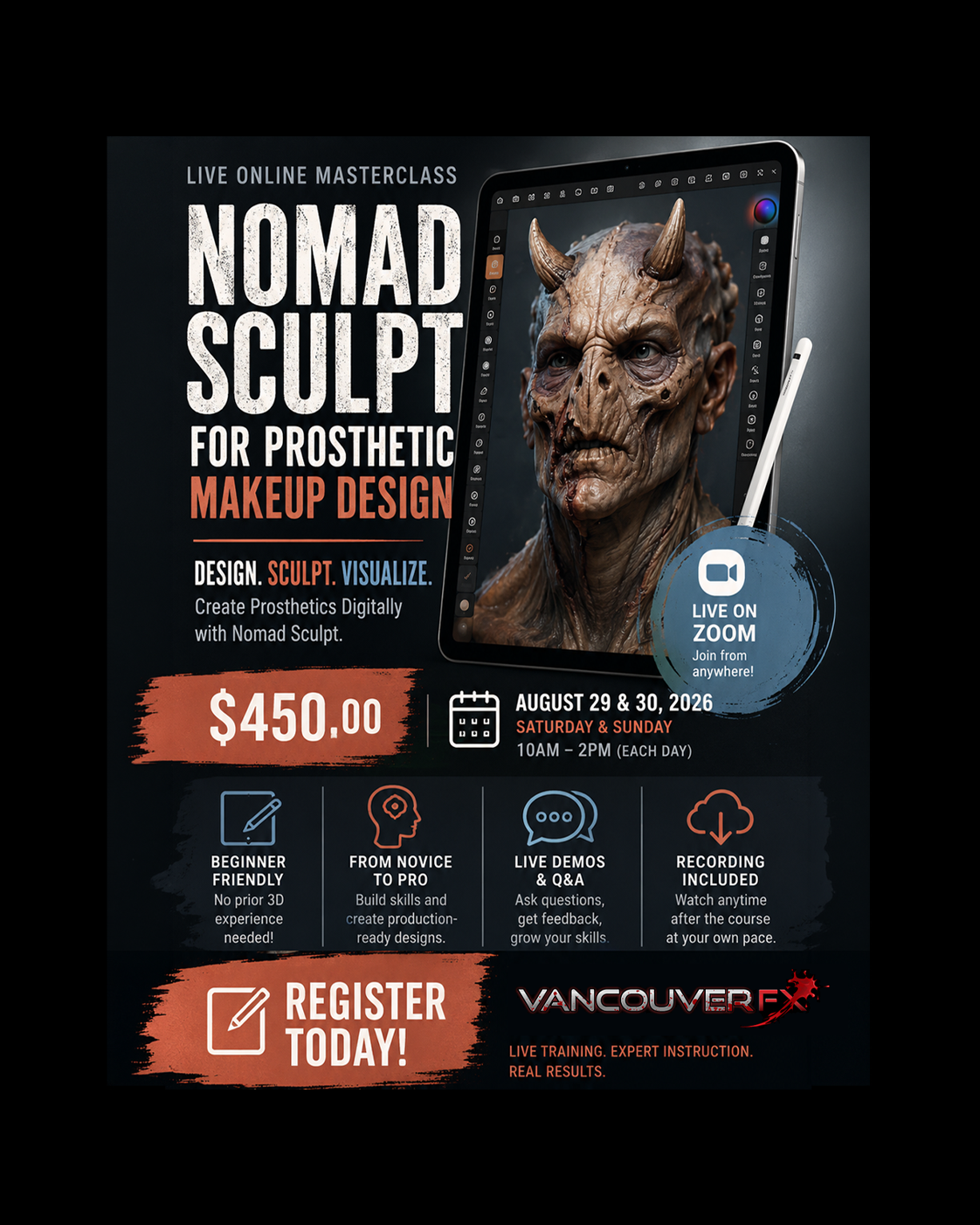
Nomad Sculpt for Prosthetic Makeup Design (Click Image For Details)
Welcome to the Nomad Sculpt for Prosthetic Makeup Design masterclass!
This intensive 2-day (8-hour total) online course is engineered to take makeup FX artists, sculptors, and designers from complete digital novices to confidently creating production-ready digital concept designs on iPad or Android tablets.
Design. Sculpt. Visualize. Create Prosthetics Digitally with Nomad Sculpt.
Course Overview
Format: Live Online Interactive Workshop
Duration: 2 Days | 4 Hours per Day (8 Hours Total)
Dates: Saturday, August 29th & Sunday August 30th, 2026
Times: 10am - 2pm
Software: Nomad Sculpt (iOS / Android)
Prerequisites: A compatible tablet + stylus (Apple Pencil / S-Pen recommended). No prior 3D software experience required!
Learn Your Way: Follow Along or Just Watch!
We know everyone learns differently. That’s why this live course offers full flexibility:
Follow along live step-by-step on your tablet alongside the demonstrations.
Sit back, watch, and take notes without the pressure of keeping up in real time.
Plus, after every class session, you'll join a live interactive Q&A with lead instructor Dallas Harvey. Bring your burning questions and troubleshoot your workflow in real time!
Live Online Training via Zoom
This course will be taught live online through Zoom, allowing students to participate from anywhere while following the complete process step by step with instructor Dallas Harvey.
Students will be able to watch live demonstrations, ask questions throughout the course, receive guidance on their work, and interact with the instructor in real time.
Day 1: 3D Fundamentals & Sculpting from Scratch
Goal: Master the Nomad Sculpt interface, understand 3D digital concepts, and build a human head starting from a basic sphere.
Hour 1: Interface & Digital Clay Basics (60 min)
Navigating the 3D Space: Orbit, Pan, Zoom, and resetting camera views.
The Toolbar Demystified: Clay, Move, Smooth, Crease, Drag, and Flatten tools.
Understanding Digital Geometry: Resolution, Dynamesh (Voxel Remesh), and Subdivisions.
Customizing Your Workspace: Setting up gestures, shortcuts, and custom UI for an efficient workflow.
Hour 2: The Block-Out Phase — Sphere to Primary Forms (60 min)
Starting with the Ball: Utilizing the Move and Drag tools to pull out basic skull proportions.
Blocking Planes: Establishing the jawline, cheekbones, brow ridge, and eye sockets.
Symmetry Tools: Working with local vs. global symmetry (and when to turn it off!).
Voxel Remeshing: Keeping geometry clean while stretching digital clay.
Hour 3: Secondary Forms & Facial Anatomy (60 min)
Fleshing out Features: Sculpting eyes, nose, lips, and ears using Clay and Layer brushes.
Anatomy for FX Artists: Understanding key bony landmarks and underlying facial muscles.
Defining Structure: Using Crease and Flatten to give forms organic crispness.
Hour 4: Detailing, Lighting & Day 1 Recap (60 min)
Tertiary Details: Introducing Alpha brushes for skin pores, wrinkles, and texture.
Basic Environment Lighting: Switching between MatCaps and PBR (Physically Based Rendering) lighting to check form.
File Management: Saving projects, managing layer stacks, and auto-backups.
Instructor Q&A & Day 1 Assignment Review.
Day 2: 3D Makeup FX Design & Digital Airbrushing
Goal: Import a real 3D scan of a face cast, design a multi-piece prosthetic appliance directly over the geometry, and paint a photo-realistic concept rendering.
Hour 1: Importing Scan Data & Workflow Set-up (60 min)
Working with Scan Data: Importing supplied OBJ/FBX face casts (lifecasts).
Prepping the Face Cast: Layering, locking layers, and scene tree organization.
Non-Destructive Workflows: Using Layers to build FX elements over the base scan without altering the original head.
Hour 2: Sculpting FX Appliances (60 min)
Concepting Prosthetics: Sculpting character elements (e.g., creature brow, cheek augmentations, mutated nose, horns, or open wounds).
Edge Blending Techniques: Feathering appliance edges smoothly onto the digital lifecast to simulate real-world silicone/latex edges.
Dynamic Layers: Adjusting appliance intensity using layer opacity sliders.
Hour 3: Digital Airbrushing & Vertex Painting (60 min)
Introduction to Paint Mode: Color, Roughness, and Metalness channels.
Digital Airbrushing: Setting up soft falloff brushes to mimic traditional Iwata/Paasche airbrush techniques.
Color Theory for FX: Splattering, vein detailing, mottling skin tones, and shading sub-dermal depth.
Masking & Stencils: Protecting sculpt areas while painting complex patterns.
Hour 4: Render Settings, Presentation & Final Export (60 min)
PBR Lighting & HDRI Maps: Setting up dramatic multi-light rigs (Key, Fill, Rim) for client presentations.
Post-Processing FX: Depth of Field (DoF), Bloom, Color Grading, and Ambient Occlusion directly inside Nomad.
Exporting for Clients & Shop Production:
Exporting high-res 2D render images (PNG/JPEG with transparent backgrounds).
Exporting 3D STL/OBJ files intended for 3D printing core molds.
Final Instructor Q&A, Feedback & Wrap-up.
Register Today
Secure your spot today and join this live online training experience from anywhere. Space is limited to ensure students have the opportunity to ask questions, interact with the instructor throughout the course. Register now to reserve your place and gain access to both the live Zoom sessions and the complete course recording.
For payment we offer two options:
1. Register online through our website and pay by credit card
2. Register by email and pay by Interac Transfer. To pay by Interac transfer email us at vancouverfxstudio@gmail.com
Welcome to the Nomad Sculpt for Prosthetic Makeup Design masterclass!
This intensive 2-day (8-hour total) online course is engineered to take makeup FX artists, sculptors, and designers from complete digital novices to confidently creating production-ready digital concept designs on iPad or Android tablets.
Design. Sculpt. Visualize. Create Prosthetics Digitally with Nomad Sculpt.
Course Overview
Format: Live Online Interactive Workshop
Duration: 2 Days | 4 Hours per Day (8 Hours Total)
Dates: Saturday, August 29th & Sunday August 30th, 2026
Times: 10am - 2pm
Software: Nomad Sculpt (iOS / Android)
Prerequisites: A compatible tablet + stylus (Apple Pencil / S-Pen recommended). No prior 3D software experience required!
Learn Your Way: Follow Along or Just Watch!
We know everyone learns differently. That’s why this live course offers full flexibility:
Follow along live step-by-step on your tablet alongside the demonstrations.
Sit back, watch, and take notes without the pressure of keeping up in real time.
Plus, after every class session, you'll join a live interactive Q&A with lead instructor Dallas Harvey. Bring your burning questions and troubleshoot your workflow in real time!
Live Online Training via Zoom
This course will be taught live online through Zoom, allowing students to participate from anywhere while following the complete process step by step with instructor Dallas Harvey.
Students will be able to watch live demonstrations, ask questions throughout the course, receive guidance on their work, and interact with the instructor in real time.
Day 1: 3D Fundamentals & Sculpting from Scratch
Goal: Master the Nomad Sculpt interface, understand 3D digital concepts, and build a human head starting from a basic sphere.
Hour 1: Interface & Digital Clay Basics (60 min)
Navigating the 3D Space: Orbit, Pan, Zoom, and resetting camera views.
The Toolbar Demystified: Clay, Move, Smooth, Crease, Drag, and Flatten tools.
Understanding Digital Geometry: Resolution, Dynamesh (Voxel Remesh), and Subdivisions.
Customizing Your Workspace: Setting up gestures, shortcuts, and custom UI for an efficient workflow.
Hour 2: The Block-Out Phase — Sphere to Primary Forms (60 min)
Starting with the Ball: Utilizing the Move and Drag tools to pull out basic skull proportions.
Blocking Planes: Establishing the jawline, cheekbones, brow ridge, and eye sockets.
Symmetry Tools: Working with local vs. global symmetry (and when to turn it off!).
Voxel Remeshing: Keeping geometry clean while stretching digital clay.
Hour 3: Secondary Forms & Facial Anatomy (60 min)
Fleshing out Features: Sculpting eyes, nose, lips, and ears using Clay and Layer brushes.
Anatomy for FX Artists: Understanding key bony landmarks and underlying facial muscles.
Defining Structure: Using Crease and Flatten to give forms organic crispness.
Hour 4: Detailing, Lighting & Day 1 Recap (60 min)
Tertiary Details: Introducing Alpha brushes for skin pores, wrinkles, and texture.
Basic Environment Lighting: Switching between MatCaps and PBR (Physically Based Rendering) lighting to check form.
File Management: Saving projects, managing layer stacks, and auto-backups.
Instructor Q&A & Day 1 Assignment Review.
Day 2: 3D Makeup FX Design & Digital Airbrushing
Goal: Import a real 3D scan of a face cast, design a multi-piece prosthetic appliance directly over the geometry, and paint a photo-realistic concept rendering.
Hour 1: Importing Scan Data & Workflow Set-up (60 min)
Working with Scan Data: Importing supplied OBJ/FBX face casts (lifecasts).
Prepping the Face Cast: Layering, locking layers, and scene tree organization.
Non-Destructive Workflows: Using Layers to build FX elements over the base scan without altering the original head.
Hour 2: Sculpting FX Appliances (60 min)
Concepting Prosthetics: Sculpting character elements (e.g., creature brow, cheek augmentations, mutated nose, horns, or open wounds).
Edge Blending Techniques: Feathering appliance edges smoothly onto the digital lifecast to simulate real-world silicone/latex edges.
Dynamic Layers: Adjusting appliance intensity using layer opacity sliders.
Hour 3: Digital Airbrushing & Vertex Painting (60 min)
Introduction to Paint Mode: Color, Roughness, and Metalness channels.
Digital Airbrushing: Setting up soft falloff brushes to mimic traditional Iwata/Paasche airbrush techniques.
Color Theory for FX: Splattering, vein detailing, mottling skin tones, and shading sub-dermal depth.
Masking & Stencils: Protecting sculpt areas while painting complex patterns.
Hour 4: Render Settings, Presentation & Final Export (60 min)
PBR Lighting & HDRI Maps: Setting up dramatic multi-light rigs (Key, Fill, Rim) for client presentations.
Post-Processing FX: Depth of Field (DoF), Bloom, Color Grading, and Ambient Occlusion directly inside Nomad.
Exporting for Clients & Shop Production:
Exporting high-res 2D render images (PNG/JPEG with transparent backgrounds).
Exporting 3D STL/OBJ files intended for 3D printing core molds.
Final Instructor Q&A, Feedback & Wrap-up.
Register Today
Secure your spot today and join this live online training experience from anywhere. Space is limited to ensure students have the opportunity to ask questions, interact with the instructor throughout the course. Register now to reserve your place and gain access to both the live Zoom sessions and the complete course recording.
For payment we offer two options:
1. Register online through our website and pay by credit card
2. Register by email and pay by Interac Transfer. To pay by Interac transfer email us at vancouverfxstudio@gmail.com